Web App Development
  Cloud App Development
  Front-End Development
  Cross Platform Development
  MVP Development
  Application Modernization
  PWA Development
  SaaS Application Development
  Software Development Outsourcing
  Offshore Custom Software Development
  Full Stack Software Development
  Custom Software Development
  Enterprise Software Development
  Cloud Computing Solutions
  Cloud Development
  Managed Cloud Services
  Cloud Native Development
  AI Consulting
  Machine Learning Development
  LLM Development
  AI Chatbot Development
  Data Analytics
  CI CD Development
  Digital Transformation
  Dev Ops
  Content Development
  Blockchain Development
  Web Development
  Web Design



 Generative AI
  Large Language Model
  AI Chatbot
  AngularJs
  ReactJS
  Dotnet Core
  Android
  iPhone
  Swift
Swift  E-Commerce
  NopCommerce
  BigCommerce
  Laravel
  Yii
Yii  AWS
AWS  Google Cloud
  Azure DevOps
  Automation Testing
  Security Testing
  API Testing
  Functional Testing
  MEAN Stack
  MERN Stack
  Full Stack Developers
  biz.encodedots
  biz@encodedots.com
  +91 738 328 3858


- What is a Traditional CMS?
- What is a Headless CMS?
- The Third Option: Hybrid CMS
- Headless CMS vs Traditional CMS
- Advantages of Traditional CMS
- Advantages of Headless CMS
- Disadvantages of Both Honest Assessment
- Choose Headless CMS
- Choose Traditional CMS
- Real-World Use Cases
- Cost Comparison
- SEO Considerations
- Final Verdict
- Conclusion
- Frequently Asked Questions
Headless CMS vs Traditional CMS: What Is Right for Your Business in 2026?
You’re building a product. Maybe it’s a mobile app. Maybe it’s an e-commerce store that also needs to deliver content to a kiosk, a web app, and even a voice assistant like Alexa.
You search “best CMS for my project”… and quickly hit a wall of conflicting opinions.
Half the internet says headless CMS is the future.
The other half says WordPress still works perfectly fine.
So, who should you believe?
Here’s the honest answer: both are right, depending on what you’re building.
This guide isn’t here to push you toward a headless CMS just because it sounds modern. And it won’t dismiss traditional CMS platforms like WordPress just to follow trends.
Instead, you’ll get a clear, practical breakdown of headless CMS vs traditional CMS so you can confidently choose what’s actually right for your business in 2026.
What is a Traditional CMS?
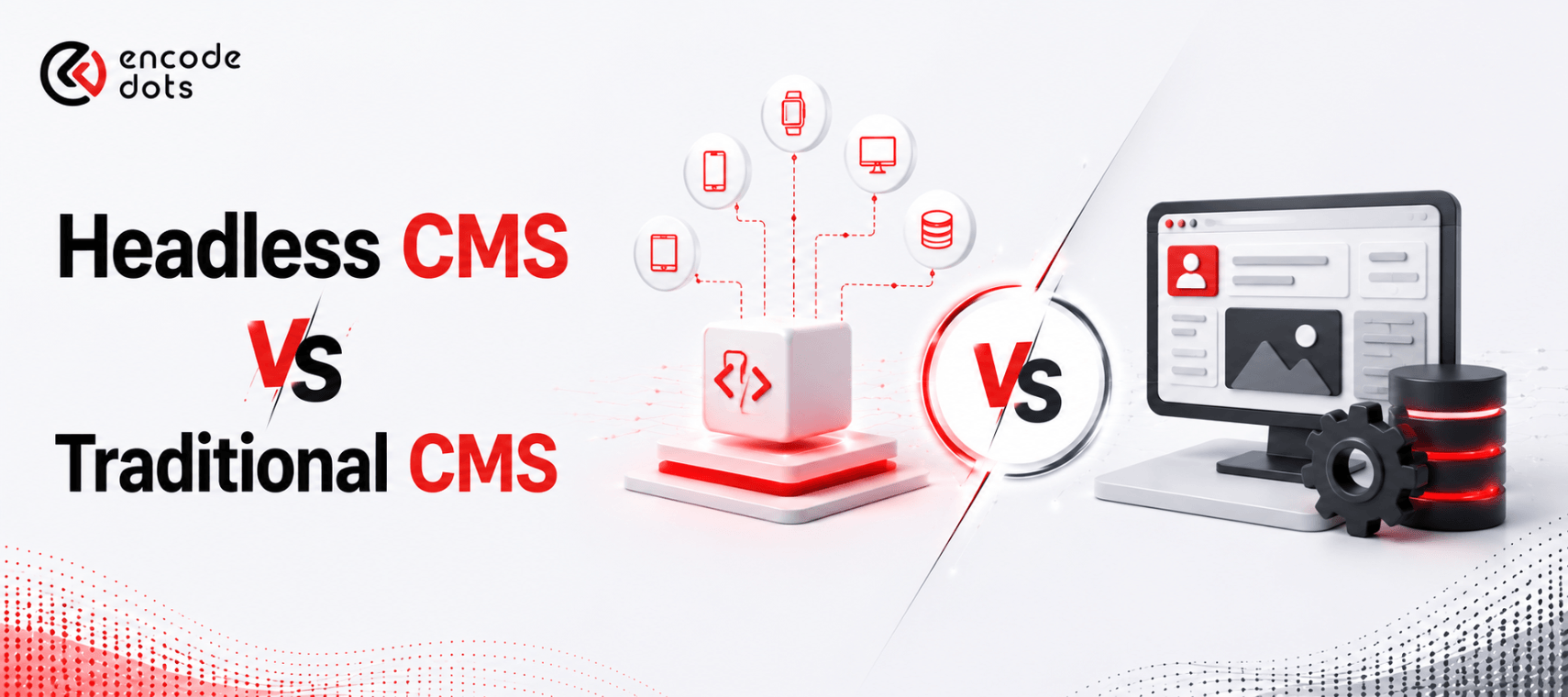
A traditional CMS is the kind of system most websites have relied on for years. Everything lives in one place where you write your content, and where that content gets displayed is tightly connected.
In simple terms, you don’t have to think about “how” your content will appear. You just publish it, and the system handles the rest using built-in themes and layouts.
Imagine it like a ready-made setup. You walk in, arrange your furniture, and everything already fits the space. It’s convenient, predictable, and easy to manage.
Platforms like WordPress, Joomla, Drupal, and Squarespace follow this approach. For example, when you publish a blog in WordPress, it not only stores your content but also automatically decides how it looks on your site.
This is exactly why traditional CMS platforms are still widely used today. They’re simple, reliable, and perfect for businesses that just need a website that works without heavy technical involvement.
What is a Headless CMS?
A headless CMS works very differently. It focuses only on managing your content, not how that content is displayed.
Instead of controlling the design, it simply delivers your content wherever you need it through APIs. That could be your website, mobile app, smartwatch app, or even something like a voice assistant.
Think of it as a central content hub. You create content once, and it gets distributed everywhere from that single source.
Unlike traditional systems, the frontend (what users see) is built separately by developers using modern frameworks. This gives teams complete freedom to design unique experiences without being limited by templates.
Tools like Contentful, Sanity, Strapi, and others follow this model. Developers fetch content using APIs and decide exactly how it should appear across different platforms.
This approach is especially useful when your product isn’t just a website but a combination of apps, interfaces, and digital touchpoints that all need to stay in sync.
The Third Option: Hybrid CMS
Here’s what nobody tells you when you’re evaluating CMS options for your next build.
Traditional CMS vendors will show you how easy it is to update a page. Headless CMS vendors will show you API diagrams and talk about omnichannel delivery. Both sound great. Neither reflects what happens when your marketing manager needs to push a landing page change at 9 PM and your developer isn’t available.
That gap between the pitch and reality? That’s where a hybrid CMS fits.
It’s not a compromise. It’s a business decision.
A hybrid CMS gives your content team a visual editing experience: drag, drop, preview, publish, while exposing everything through APIs for developers. Marketing can move fast without filing tickets. Developers don’t need to build custom admin systems. Both sides get what they actually need.
The setup is straightforward: your existing CMS remains the content backbone, while a modern frontend (Next.js, Nuxt, or similar) sits on top, pulling content via APIs. The business sees no disruption, and the development team gains flexibility.
Why this matters more than the “headless vs traditional” debate
Most businesses aren’t starting from scratch. Hybrid gives you a way to modernize your system without rebuilding everything from scratch.
Hybrid offers a practical path forward. You modernize where it matters, keep what’s working, and evolve your architecture without starting over.
That’s not settling. That’s how smart systems get built.
Headless CMS vs Traditional CMS: Side-by-Side
Forget the marketing language for a second. Here’s what this decision actually comes down to when you’re building something real.
| Factor | Traditional CMS | Headless CMS |
| How it’s built | Content and design live in the same system; change one, you risk the other | Content sits in one place, your frontend lives somewhere else entirely, and they talk via API |
| Time to launch | Days to a few weeks if you’re using existing themes | Weeks to months, your frontend doesn’t exist yet; someone has to build it |
| Initial spend | Low entry point, basic setups can go live under $2K | Frontend development alone can run $15K–$80K, depending on complexity |
| Cost over 3 years | Quietly increases plugin updates, security patches, and performance fixes | Tends to flatten less dependency overhead, fewer surprise costs |
| Where your content goes | Mostly, one website getting it elsewhere requires workarounds | One content source, everywhere web, app, voice interface, whatever comes next |
| Who can edit content | Anyone on your team visual editor, click to publish, no dev needed | Editors can still manage content, but previewing it requires extra setup |
| Speed | Depends on your hosting and how many plugins you’ve stacked | Fast by default API + CDN delivery, no server rendering bottlenecks |
| Security exposure | Every plugin is a potential entry point for third-party code running on your site | Smaller surface area, frontend and backend are completely separate systems |
| AI and future integrations | Content lives inside HTML, hard to extract, hard to feed into AI workflows | Content is structured data that AI systems can read and use directly |
| Dev team experience | Developers work inside the CMS rules, a limited framework choice | Full freedom React, Next.js, Vue, whatever your team is best at |
| Who you actually need | Content updates don’t require a developer | You need a frontend dev for setup, new features, and channel expansions |
In simple terms, traditional CMS is faster and cheaper to start, while headless CMS offers better flexibility and scalability long-term.
Advantages of Traditional CMS
1. Ready to Use, Fast
You can have a WordPress site live in a day. Themes, plugins, drag-and-drop builders, everything is already there. You don’t need a dedicated developer to launch or maintain it.
2. Non-Technical Teams Can Handle It
Marketing teams can publish blog posts, update landing pages, and manage media without touching a single line of code. That independence matters for small businesses and growing startups.
3. Budget-Friendly for Most Projects
Shared hosting, free themes, and open-source plugins mean you can run a fully functional business website for very low cost. For a local business or a personal brand, it’s hard to beat.
4. Large Ecosystem
WordPress has 59,000+ plugins. Whatever you need, SEO, ecommerce, forms, analytics, there’s a plugin for it. The ecosystem is mature, well-documented, and supported by a massive community.
Ready to find the right CMS architecture for your business?
Book a free consultation with EncodeDots and get a clear recommendation based on your actual use case, team, and budget.
Let's talk!Advantages of Headless CMS
1. True Omnichannel Content Delivery
In 2026, your users aren’t just on your website. They’re on mobile apps, smart TVs, voice assistants, AR interfaces, and IoT devices. A headless CMS lets you publish once and deliver everywhere through APIs. One content update, multiple frontends, no duplication.
2. Faster Performance
Because the frontend is completely custom-built (often as a static site or server-side rendered React app), it’s lean, fast, and optimized. No bloated themes. No unused plugin code is loading on every page. The result? Better Core Web Vitals and faster load times.
We’ve seen clients move from WordPress-based ecommerce sites to headless setups and cut their page load times by 40–60%. That directly impacts conversion rates.
3. Full Developer Freedom
Frontend developers can use whatever they want: Next.js, Remix, Astro, Vue. Backend developers aren’t limited by the CMS’s built-in capabilities. Teams can adopt modern development workflows, CI/CD pipelines, and version-controlled codebases properly.
4. Better for Scaling Products
If you’re building a SaaS product, a large ecommerce platform, or a digital experience that will grow significantly, headless architecture scales better. You can scale the frontend and backend independently. Adding new channels doesn’t require rearchitecting your content system.
5. Stronger Security Posture
With no exposed frontend tied to the CMS, the attack surface is smaller. WordPress vulnerabilities (often from plugins) are a constant concern. A headless setup significantly reduces that risk.
Disadvantages of Both Honest Assessment
Where Traditional CMS Starts to Break
1. Performance hits a ceiling
At the start, everything feels fast. But as you add plugins, custom features, and integrations, things slow down. A heavily customized WordPress setup can become harder to optimize over time.
2. Short-term savings, long-term complexity
It’s cheap to get started, that’s the appeal. But as your site grows, maintaining plugins, fixing conflicts, and handling updates can quietly turn into ongoing overhead.
3. Flexibility has limits
If your needs go beyond a standard website, like building a mobile app or syncing content across multiple platforms, traditional CMS starts feeling restrictive. You end up forcing it to do things it wasn’t built for.
4. Security depends on maintenance
Most vulnerabilities don’t come from the CMS itself, but from outdated plugins and themes. If updates are ignored, the risk increases quickly.
Where Headless CMS Gets Challenging
1. Higher upfront investment
You’re not just setting up a CMS, you’re building an entire frontend separately. That means more development time, more planning, and a bigger initial budget.
2. Slower to launch
There’s no “install a theme and go live” option here. Everything from design to frontend logic needs to be built, which naturally takes more time.
3. Content preview isn’t always straightforward
Editors can’t always see exactly how content will look instantly. While modern tools offer previews, it’s not as seamless as traditional CMS platforms.
4. SEO requires real implementation
Unlike WordPress, where plugins handle most SEO basics, headless setups depend on proper development. Things like rendering, meta tags, and structured data need to be handled carefully.
5. Not built for simple use cases
If you’re just building a small business website or a basic landing page, going headless can be unnecessary. It’s like using a high-performance system for a very simple job.
When Should You Choose Headless CMS?
Choose headless if any of these apply to your business:
- You’re building a mobile app that also needs a web presence. Headless lets both share one content source
- You need an omnichannel content delivery website, app, kiosks, wearables, and voice interfaces
- Performance is critical for high-traffic ecommerce, SaaS dashboards, and media platforms
- Your dev team is strong, and you have React/Next.js developers who will own the frontend
- You’re building for scale, you expect significant growth in users or content volume
- You need a custom UI; your design is complex enough that no theme will ever capture it properly
- Security is a priority for fintech, healthcare, or regulated industry platforms
Headless CMS use cases in 2026:
- D2C ecommerce brands delivering to web + app + in-store displays
- SaaS companies with content-heavy product dashboards
- Enterprise businesses managing content across multiple markets and languages
- Digital media platforms with high traffic and custom experiences
When Should You Choose Traditional CMS?
Don’t let the hype convince you that traditional CMS is outdated. It’s the right tool in many situations:
- You’re building a blog or content site, WordPress is still unbeatable for pure content publishing
- Your team is a non-technical marketing teams need to manage the site without developer help daily
- Budget is tight, and a $10/month WordPress setup genuinely works for early-stage startups and small businesses
- You need to launch fast. A headless setup takes 4–12 weeks of development; WordPress can be live in 2 days
- Your content only goes to one place if it’s just a website; the complexity of headless adds no value
- You need a plugin ecosystem: WooCommerce, LearnDash, WPForms. The plugin library solves problems out of the box
Traditional CMS use cases in 2026:
- Local service businesses (plumbers, dentists, consultants)
- Blogger and content creator websites
- Early-stage startup landing pages and MVPs
- Small ecommerce stores (under 500 SKUs, lower traffic)
- Corporate brochure sites with infrequent updates
Real-World Use Cases
E-commerce Brand Moving to Headless
A fashion brand was on WooCommerce. Fast growth meant they needed a mobile app, a loyalty program interface, and a wholesale portal all pulling the same product catalog. Rebuilding this in WordPress was painful. Moving to Shopify Hydrogen (headless) with Contentful as the CMS lets all three frontends share one content and product feed. Faster, cleaner, scalable.
Startup Choosing Traditional CMS
An early-stage B2B SaaS company needed a marketing website to support their launch. Budget: $5,000. Timeline: 3 weeks. They built on WordPress with a premium theme, Elementor for page building, and Yoast for SEO. It worked. The site ranked, captured leads, and the marketing team managed it independently. Headless would have cost 4x more and taken twice as long for zero measurable benefit at that stage.
Enterprise Choosing Headless
A retail chain operating across Australia and the US needed to push content to their website, in-store digital signage, a loyalty mobile app, and email templates, all from one system. Contentful, as a headless CMS with a Next.js frontend, made this possible. A traditional CMS would have required four separate content systems with manual updates.
Cost Comparison: Headless CMS vs Traditional CMS
| Cost Factor | Traditional CMS | Headless CMS |
| Initial Setup | $500–$5,000 | $10,000–$50,000+ |
| Hosting | $10–$100/month | $50–$500/month (frontend + CMS SaaS) |
| CMS Licensing | Free (WordPress) or low cost | $0 (Strapi, open-source) to $500+/month (Contentful, Sanity) |
| Ongoing Dev Cost | Low (plugins handle most things) | Medium–High (custom features need developers) |
| Maintenance | Plugin updates, backups | Frontend deployments, API versioning |
| Scaling Cost | Moderate | More predictable at scale |
The honest summary: headless costs more upfront but can save money at scale if you’re managing multiple channels. For a single-channel website, traditional CMS almost always wins on cost.
SEO Considerations in 2026
Is Headless CMS Bad for SEO?
Not inherently, but it requires more deliberate engineering.
With WordPress, SEO basics are handled by plugins like Yoast or RankMath. With headless, your dev team is responsible for:
- Proper server-side rendering (SSR) or static generation, if pages are rendered client-side only, search engines may not index them properly
- Meta tags and structured data are manually implemented in your frontend framework
- Sitemap generation built into WordPress; must be custom-built or handled via a package in headless setups
- Core Web Vitals headless can actually improve these if the frontend is well-built; it can also hurt them if it’s done carelessly
With Next.js or Astro as your frontend, a headless CMS can achieve excellent SEO results, sometimes better than a bloated WordPress install. But it requires developers who understand both the framework and SEO requirements.
AI Overviews and GEO visibility in 2026: Search is shifting. AI-generated answers pull from well-structured content. Whether you use headless or traditional CMS, structured data, clear definitions, and semantic HTML matter more than ever.
Final Verdict: Headless CMS or Traditional CMS?
Here’s the decision framework, simplified:
Choose Traditional CMS if: You need speed to market, low cost, non-technical team management, and you’re delivering content to one channel (your website).
Choose Headless CMS if: You’re building for multiple channels, need high performance at scale, have development resources, and are willing to invest more upfront for long-term flexibility.
Neither is universally better. The “headless CMS is the future” crowd is right for certain contexts. The “WordPress still works great” crowd is also right for different contexts.
The mistake businesses make is choosing based on trends rather than their actual requirements. A well-built WordPress site will always outperform a poorly implemented headless setup and vice versa.
Not sure which CMS architecture fits your product roadmap? Let’s help you decide. Our team has built both, and we’ll give you a straight answer based on what your business actually needs, not what’s trendy.
Conclusion
The headless CMS vs traditional CMS debate doesn’t have a universal winner. It has the right answer for your business, and that answer comes from understanding your product requirements, team capabilities, and budget.
Traditional CMS is reliable, accessible, and cost-effective for most standard websites. Headless CMS is powerful, flexible, and purpose-built for the omnichannel, high-performance digital products of 2026 and beyond.
If you’re building a blog or a small business site, use WordPress. If you’re building a product that needs to scale across web, app, and beyond, it’s time to think headless.
Talk to our experts and choose the right CMS architecture for your business today. At EncodeDots, we’ve helped startups and enterprises make this exact decision, and we’ll make sure you build on the right foundation from day one.